 12ozCode
WINDOWS_APPLICATION
Lumctl
Control multiple hardware-monitor brightness levels from one lightweight Windows utility, with independent display controls and saved startup settings.
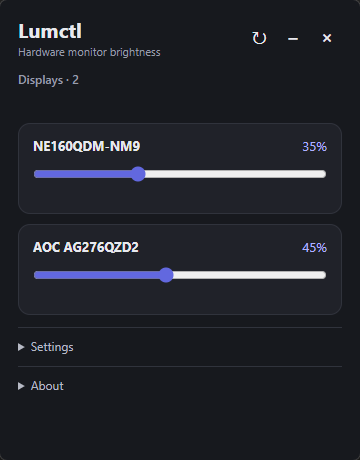
DDC/CI monitor brightness control for multiple displays on Windows.
- Control DDC/CI monitor brightness.
- Control multiple displays independently.
- Restore saved brightness on startup.
- Optionally launch with Windows.
- Stay lightweight and out of the way.
Optional anonymous diagnostics and usage analytics can be disabled in Settings. Lumctl uses a random installation ID and sends only minimal crash, performance, startup, version, OS, and architecture data; it does not send usernames, emails, screenshots, keyboard input, or monitor identifiers.
Read full privacy details...
If anonymous diagnostics are enabled, Lumctl sends sanitized error reports, crash stack traces, sampled performance measurements, and a startup usage counter to our Sentry project. A random installation UUID is used only as an anonymous Sentry user ID so we can estimate unique and active installations; it is not your Windows account, hostname, email, or a hardware or monitor identifier. Telemetry may include the Lumctl version, Windows version, CPU architecture, operation type, and monitor-control backend. Reports do not intentionally include monitor names, brightness values, settings, screenshots, keyboard input, or console output. Lumctl does not collect or send an IP address itself; Sentry receives the network source IP while processing telemetry, and project IP storage is disabled. Sentry may derive country information according to its privacy settings. Keeping anonymous diagnostics enabled helps us understand application usage and detect, understand, and fix crashes and performance problems. When diagnostics are disabled, telemetry is not sent. You can disable diagnostics at any time in Settings.
4BC6B92CCFBB1D921C172987ED1CC6DF81429D4B001593BA9DB45A6F3FA24910